As difficult as this might look, don't worry, this is all quite simple.
If you wish to play using a cracked account, you are required to have downloaded Java 8 for your cracked client to be able to play Minecraft. Oracle, the typical place where you'd be able to get Java requires an account and "support contract" to download certain versions, instead what you can do is simply download an alternative. This guide recommends installing OpenJDK from one of the reputable vendors. OpenJDK is a source code only distribution of Java made by a collaboration between Oracle and industry partners such as Adoptium, Microsoft, Red Hat, and Azul. Here are two good options to use :
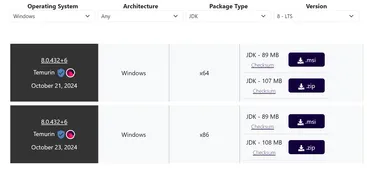
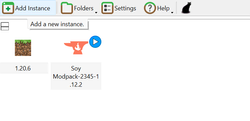
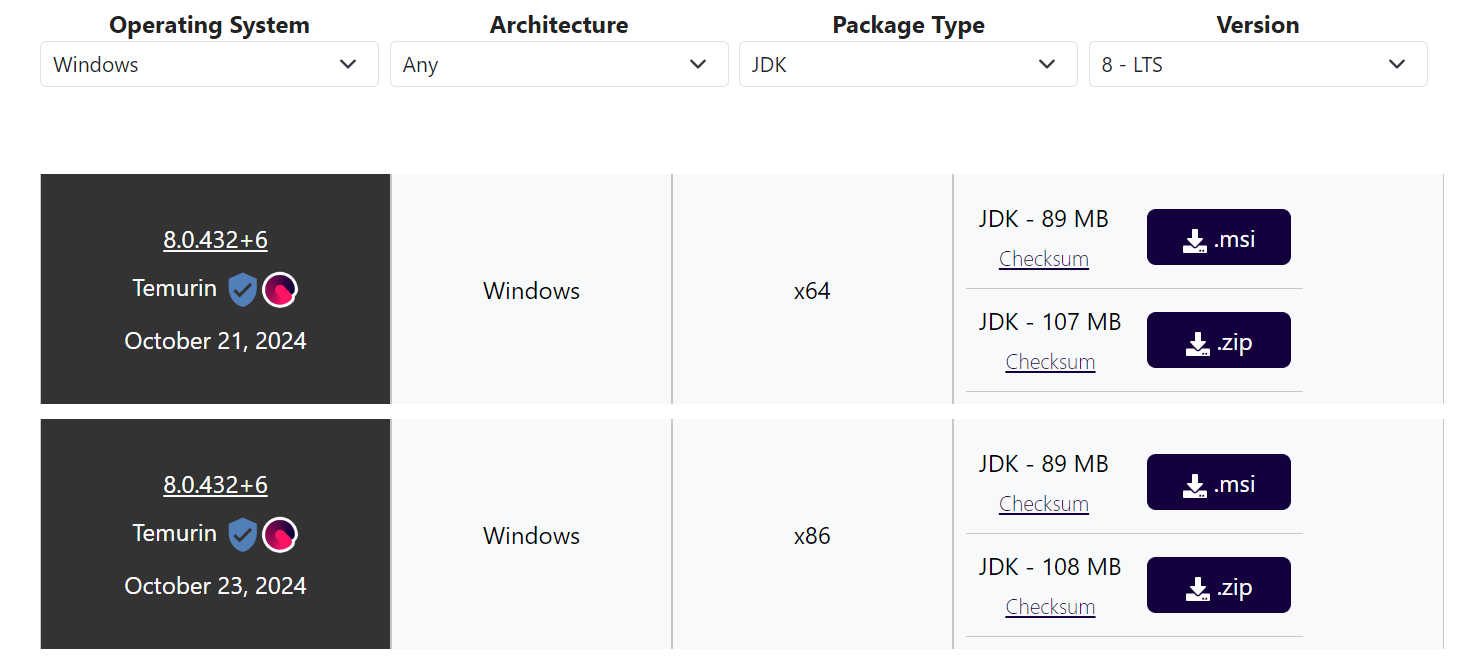
Azul OpenJDKIn this tutorial, we will use Adoptium. Depending on which operating system you are using and other things select the package that is available. Use VERSION 8! As Minecraft 1.12.2 runs on this version of Java.Here is how it should probably look if you use Windows. Select the architecture depending on what your system uses.After you're done with downloading Java, download a cracked client. You can for example use PolyMC, or FjordLauncher. (You can also use Prism Launcher, MultiMC and many different alternatives.) There are many options to choose from, however the tutorial will continue on PolyMC. [https://soyjak.st/static/soycraft-modpack.zip[IT'S OVER] The modpack is available to download HERE]After having had Java 8 installed and set as your default version of Java in the Settings of PolyMC, download the modpack and click on "Add Instance"Finally, after having had done all of this, select to "Import zip" and simply put the modpack zip into there, click and run the game to see if everything works, then add the server and you are probably done, good job.
Introduces a variety of unique and quirky mobs, each with distinct behaviors, drops, and designs. It adds a whimsical touch to exploration and encounters.
An adventure and dungeon mod featuring randomly generated structures, custom bosses, unique loot, and powerful weapons. It enhances exploration with challenging combat and treasure-filled dungeons.
A core mod for the Thermal series, it adds essential materials, ores, and resources used in tech and automation, such as Copper, Tin, and unique tools like Flux Capacitors.
A tech mod with a focus on realism and industrial aesthetics. It features multiblock machines, power systems, and pipelines to automate processes in a visually immersive way.
An expansion for HBM’s Nuclear Tech Mod, it focuses on advanced weaponry, nuclear tech, and power systems, adding bombs, reactors, and futuristic tools for combat and industry.
A tool and weapon customization mod that allows players to craft modular tools with unique materials, traits, and upgrades. It features smelteries, alloys, and repairable tools.
Adds new crops, fruit trees, and farming mechanics to Minecraft, expanding agricultural gameplay with realistic growth cycles, recipes, and decorative features for a richer farming experience.
Improves fishing by adding new fish species, custom fishing rods, and unique loot. It also introduces fish-related items and gear for more engaging aquatic exploration.
Adds new Enderman-like mobs, including friendly villagers, warriors, and hostile titans. It features unique trades, structures, and items, enhancing the lore and gameplay surrounding the Endermen.
Introduces customizable painting mechanics, allowing players to create pixel art, decorate their builds with unique designs, or use colorful paints to add a personal touch to structures.
Enhances Minecraft's wolves with a leveling system, customizable abilities, and improved AI. Players can train their dogs to perform tasks like combat, fetching, or guarding, making them loyal companions.
Soycraft: Modded Edition is part of a series on Videogames