Regular expression

/r[aeiou]+/g (lowercase r followed by one or more lowercase vowels).A regular expression (or regex, regexp) or rational expression[British people say this] is a sequence of characters used to match a pattern in text. It is not a programming language like other languages would be, but is often heavily integrated into other programming language standard libraries.
Use on the sharty
[edit | edit source]It can be used on the sharty for:
- Datamining during raids over large databases for names (doxing)
- Setting up filters for post filtering
- Word filters
Metacharacters
[edit | edit source]

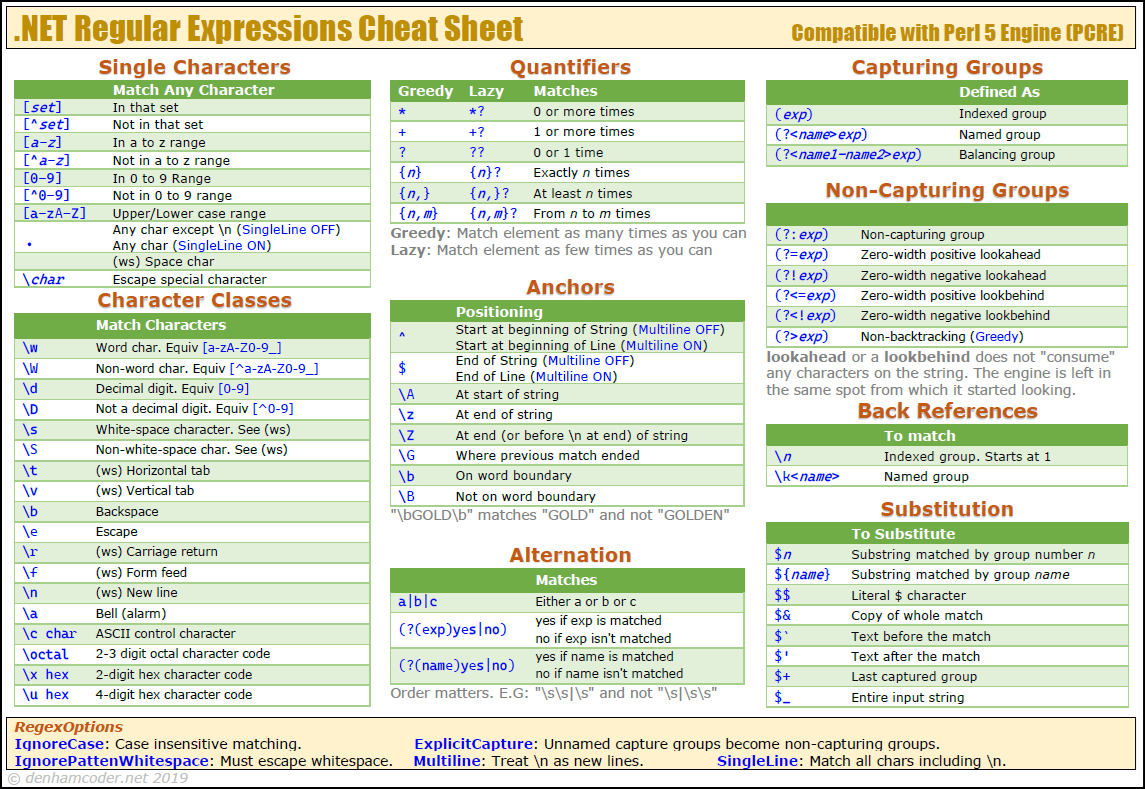
Regular expressions use special characters, called metacharacters, to control how patterns are matched. Common ones include:
.— Matches any single character except newline (wildcard)^— Matches the start of a string (start anchor)$— Matches the end of a string (end anchor)*— Matches zero or more of the preceding element+— Matches one or more of the preceding element?— Matches zero or one of the preceding element (also used for non-greedy quantifiers){n},{n,},{n,m}— Matches a specific number or range of repetitions{n}— Specifically n repetitions{n,}— n or more repetitions{n,m}— At least n repetitions, but not more than m repetitions
[…]— Defines a character class, e.g.[aeiou]matches vowels[^…]— Negated character class, e.g.[^0-9]matches anything except digits()— Groups expressions and captures matches(?: )— Groups expressions without capturing|— Alternation (logical OR), e.g.cat|dog\\— Escapes a metacharacter to match it literally\d,\w,\s— Common shorthand classes (digits, word chars, whitespace)\d— Digit characters\w— Alphanumeric characters\s— Whitespace characters\b— Word boundaries\z— Matches the end of a string, but not an internal line
\D,\W,\S— Negated versions of the shorthand classes\D— Non-digit characters\W— Non-alphanumeric characters\S— Non-whitespace characters\A— Matches the beginning of a string, but not an internal line
These metacharacters can be combined to form complex and powerful search patterns.
Character Classes
[edit | edit source]These examples show how classes, anchors, quantifiers, groups, and lookarounds can be combined and negated to create flexible patterns.
[a-zA-Z0-9]+— matches one or more alphanumeric characters\b\w{3,5}\b— matches words of 3 to 5 letters(cat|dog)s?— matches "cat", "cats", "dog", or "dogs"\d{2,4}-\d{2}-\d{2}— matches dates like 2025-10-04 or 25-10-04[^aeiou]{3,}— matches three or more consecutive non-vowel characters\b(?:Mr|Ms|Dr)\. [A-Z][a-z]+\b— matches titles like "Mr. Smith" or "Dr. Jones"^(?:https?|ftp)://[^\s/$.?#].[^\s]*$— matches a basic URL
Example
[edit | edit source]This is an example of using a regex pattern to validate an email address in Java.
^[a-zA-Z0-9_+&*-]+: Matches the username part (letters, digits, underscores, plus, etc.).(?:\\.[a-zA-Z0-9_+&*-]+)*: Matches optional parts for periods between characters in the username.@: Matches the "@" symbol separating username and domain.(?:[a-zA-Z0-9-]+\\.)+: Matches the domain name, allowing subdomains.[a-zA-Z]{2,7}$: Ensures the domain ends with a valid top-level domain (TLD), like.com,.org, etc.
package party.soyjak.example;

import java.util.regex.Matcher;
import java.util.regex.Pattern;

public class RegexExample {
    public static void main(String[] args) {
        // Sample email to test
        String email = "test@example.com";

        // Regex pattern for a basic email validation
        String emailPattern = "^[a-zA-Z0-9_+&*-]+(?:\\.[a-zA-Z0-9_+&*-]+)*@(?:[a-zA-Z0-9-]+\\.)+[a-zA-Z]{2,7}$";
        Pattern pattern = Pattern.compile(emailPattern);
        Matcher matcher = pattern.matcher(email);

        if (matcher.matches()) {
            System.out.printf("%s is a valid email address.%n", email);
        } else {
            System.out.printf("%s is not a valid email address.%n", email);
        }
    }
}
If you want to create your own patterns and test them interactively, try RegExr, an online regex tester and debugger. It breaks down patterns step by step and also has a library of community-made regex snippets you can use.
If you're a retard who still can't understand anything or a lazy ass nigger you can also ask LLM for you to generate regular expression you want, and then debug it in RegExr.
Regular expression denial of service
[edit | edit source]
A regular expression denial of service (ReDoS) attack involves providing a regular expression that takes a long time to evaluate. Similar to a DDoS attack, it is used to render a service unusable. This is caused by nondeterministic automata, for example trying to use backtracking which takes exponential time complexity. To prevent it, one should use libraries that use deterministic finite automata, or use timeouts to cancel evaluations that exceed a threshold.
Deterministic finite automata
[edit | edit source]This uses the RE2 library for C++.
import <re2/re2.h>;

import std;

using std::string;
using re2::RE2;

int main(int argc, char* argv[]) {
    string text = "aaaaaaaaaaaaaaaaaaaaaaaaaaaaaaa!"
    string pattern = "(a+)+$";
    bool match = RE2::FullMatch(text, pattern);
    std::println("Match result: {}", match);
}
Timeout
[edit | edit source]Some libraries offer a timeout property in the regular expression if it takes too long to match. For example, in C#:
namespace SoyjakParty.Examples;

using System;
using System.Text.RegularExpressions;

public class Example
{
    static void Main(string[] args)
    {
        string pattern = @"(a+)+$";
        string input = "aaaaaaaaaaaaaaaaaaaaaaaaaaaaaaaX";

        try
        {
        	Regex re = new(pattern, RegexOptions.None, TimeSpan.FromMilliseconds(100));
            bool match = re.IsMatch(input);
	        Console.WriteLine($"Match result: {match}");
        }
        catch (RegexMatchTimeoutException ex)
        {
	        Console.WriteLine($"Regex operation timed out! {ex.Message}");
        }
    }
}
If manually implementing timeouts (in Java):
package party.soyjak.examples;

import java.util.concurrent.*;
import java.util.regex.*;

public class Example {
    public static boolean matchesWithTimeout(String regex, String input, long timeoutMillis) {
        ExecutorService executor = Executors.newSingleThreadExecutor();

        Future<Boolean> future = executor.submit(() -> {
            Pattern pattern = Pattern.compile(regex);
            Matcher matcher = pattern.matcher(input);
            return matcher.matches();
        });

        try {
            return future.get(timeoutMillis, TimeUnit.MILLISECONDS);
        } catch (TimeoutException e) {
            System.err.printf("Regex evaluation timed out: %s%n", e.getMessage());
            return false;
        } catch (InterruptedException | ExecutionException e) {
            System.err.printf("Interruption or execution: %s%n", e.getMessage());
            e.printStackTrace();
            return false;
        } finally {
            future.cancel(true); // Stop the thread
            executor.shutdownNow();
        }
    }

    public static void main(String[] args) {
        String regex = "(a+)+$";
        String input = "aaaaaaaaaaaaaaaaaaaaaaaaaaaaaaa!";
        boolean result = matchesWithTimeout(regex, input, 100); // 100 ms timeout
        System.out.printf("Match result: %s%n", result);
    }
}
Computing | ||
|---|---|---|
| /languages | ||
| /software |
| |
| /cyb | ||
| /misc | ||
| /ai |
| |

Peer reviewed sources [+]
| |
Fields of science [+]
Ajakogenesis ♦ Archeology ♦ Biology ♦ Mathematics ♦ Nutritionial science ♦ Philosophy ♦ Physics ♦ Programming ♦ Psychology ♦ Robotics ♦ Sociology ♦ Technology ♦ Virology ♦ Zoology | |
Science in praxis [+]
Abortion ♦ Atheism ♦ Bugs ♦ Communism ♦ Fourth Industrial Revolution ♦ Meds ♦ Pod ♦ Quarantine | |
Theoretical branches [+]
|