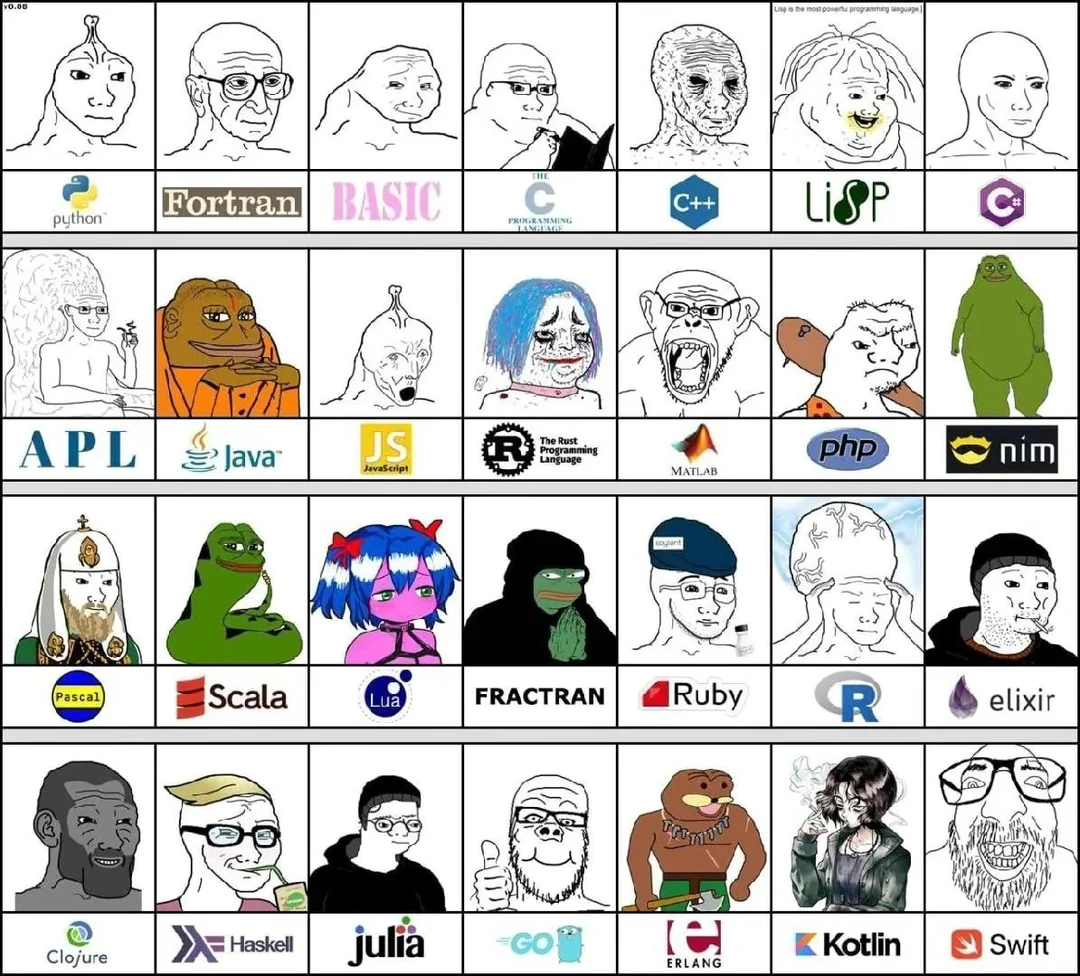
Programming


Programming is the act of using a programming language to create computer programs. It is highly related to mathematics and science.
Use by the sharty
[edit | edit source]Programming is used to do the following:
- Game development, such as making gemmy games like Five Nights at Cobson's
- Conduct raids on websites using automated scripts, and ████ attacks.
- Create Flash gems
- Automating doxing and trolling
- McChallenge
How to learn how to program
[edit | edit source]
To learn how to program, you should try to make projects of your own. If you’re already familiar with one language, learning another will feel almost intuitive. Building things from scratch is the ultimate way to get better, because it forces you to think critically, troubleshoot, and apply concepts in real-time. Learning how to program is less about memorizing syntax and more about learning how to think, experiment, and build. By starting with a solid foundation, making things that matter and getting real world experience you’ll be on your way to mastering programming in no time. Below is a practical, modern guide aimed at beginners and self‑taught programmers. <--- snca nvke below just use chatbbc and praise our AI overlords
Pick a language with a purpose
[edit | edit source]Take the language you are most familiar with to start your project. If the problem is too easy, pick one that you've never used. Don't be afraid to write awful code, and don't worry about the best implementation. Get a working implementation first, then refactor and clean it up. Once you know one language, others become much easier.
The 'ki has tutorials on the following languages:
- C tutorial
- C++ tutorial
- C# tutorial
- Java tutorial
- Python tutorial
- Rust tutorial
Understand the problem
[edit | edit source]If a problem seems difficult, good! Break it down into smaller pieces and think about what inputs, outputs, and constraints exist. Write notes, sketch diagrams, or describe the solution in plain language. Do whatever you need to do so solve it. If you can explain the solution without code, you’re much more likely to implement it successfully.
If the problem your solving is too easy, brainstorm and try adding additional functionality. Try combining it with other ideas to make your software more challenging!
Finding and using resources
[edit | edit source]Use Wikipedia, Stack Overflow, Google, and official documentation. Seriously, this is all you’ll ever need.
If you aren’t getting useful results, you probably aren’t researching effectively. Learn how to search for exact error messages, read existing answers carefully, and cross-reference multiple sources instead of relying on a single result.
If the answers truly don’t exist, create a thread or ask a question. By doing so, you help others who run into the same problem later.
Tutorials such as FreeCodeCamp, Harvard CS50 and W3Schools are good to help you get started, but they are mediocre as a long‑term learning strategy.
AI tools are especially good at explaining concepts, refactoring code, and suggesting alternatives, but you should still verify and understand the output, and avoid vibe coding.
Start simple
[edit | edit source]When beginning a project, aim for the simplest possible version that works. Don’t try to implement every feature at once. A basic, functional program is always better than an ambitious idea that never gets finished.
Once the core functionality works, gradually add complexity and improvements.
Test and break your code
[edit | edit source]Get used to thinking about how your program can fail. Try incorrect inputs, edge cases, and unexpected usage. Breaking your own software is one of the fastest ways to understand and find bugs in your software.
Write things down
[edit | edit source]If a problem is confusing, write it out. Draw it. Explain it to yourself in plain English. Many problems become obvious once they are written down instead of kept in your head.
Documenting your thoughts also makes it easier to return to a project later.
Commit and keep your work
[edit | edit source]Use version control and commit your work regularly, even if the project isn’t finished. Keeping a history of your progress is important for building a portfolio.
Unfinished projects are still valuable if they show effort, experimentation, and growth. We at Soyjak wiki recommend Git, it is the defacto standard used by everyone.
Combine ideas
[edit | edit source]If a challenge feels too straightforward, combine it with another one or try implementing it in a different programming language. Add features, try new techniques, new styles, go crazy!
Expect frustration
[edit | edit source]Programming can be extremely frustrating. Bugs will make no sense. Things will fail silently. You will feel stupid. This is normal.
Every programmer, beginner or expert, experiences this regularly. The difference is that experienced programmers know the frustration will eventually pass.
Programming challenges
[edit | edit source]If you need ideas for projects, here's a list of programming challenges you can try.
| Ratings |
|---|
Easy |
| # | Challenge | Difficulty | Category |
|---|---|---|---|
| 1 | Download manager | Medium | Practical |
| 2 | Eleastic producer/consumer task queue | Medium | |
| 3 | IRC client | Medium | |
| 4 | Markov Chain Sentence Generator | Easy | |
| 6 | MIDI player + editor | Medium | |
| 7 | Stock market simulator using Yahoo spreadsheet data | Medium | |
| 8 | Parametric/Graphic Equalizer for .wav files | Hard | |
| 9 | Graphing calculator | Medium | |
| 10 | To-Do List application | Easy | |
| 11 | Verlet Integration | Hard | |
| 12 | TCP/UDP Chat Server + Client | Medium | |
| 13 | Music Streaming | Hard | |
| 14 | Shazam | Medium | |
| 15 | Chatbot | Easy | |
| 16 | Curses Text Editor | Medium | |
| 17 | Paint Clone | Medium | |
| 18 | Image to ASCII Art | Easy | |
| 19 | Booru Image Downloader | Medium | |
| 20 | Image Converter | Medium | |
| 21 | ID3 reader | Medium | |
| 22 | Sound Synthesis (Sine, square, sawtooth, etc..) Fuck you mode: Realtime MIDI playback with Custom instruments |
Hard | |
| 23 | C++ IDE Plugin for Sublime/Atom (Auto-Complete, Go-To symbol, Decleration and Definetion of Clang's ASTS) |
Medium | |
| 24 | Simple version control supporting checkout, commit, unlocking, and per-file configuration of number of revisions kept | Medium | |
| 25 | Imageboard | Easy | |
| 26 | Password Manager | Medium | |
| 27 | Torrent Client | Hard | |
| 28 | Booru Client | Hard | |
| 29 | Key press bot | Medium | |
| 30 | IP/URL Obsucrification | Medium | |
| 31 | Radix Base Converter (Given a radix base, convert it it decimal) | Medium | |
| 32 | Chan aggregator (Lets's users vie various boards from different 'chans') | Hard | |
| 33 | Encrypt a File, and Upload it online | Medium | |
| 34 | Make a text editor that autosaves and includes the date in the file name | Hard | |
| 35 | Create a HSV Color Representation | Easy | |
| 36 | Window Manager | Medium | |
| 37 | Basic Relational Database Software (SQL Support, Handle Relationships, Focus on Efficiency) |
Fuck you | |
| 38 | Pixed Editor | Medium | |
| 39 | Trivial File Transfter Protocol | Medium | |
| 40 | Markdown (HTML/XML) Editor | Medium | |
| 41 | IP Tracking Visualization | Medium | |
| 42 | Port Scanner | Easy | |
| 43 | Old School Demo Effect (Plasma, Tunnel, Scrollers, Zoomers, etc...) | Easy | |
| 44 | FizzBuzz | Easy | Algorithmic |
| 45 | RPN Calculator | Easy | |
| 46 | Count occurrences of characters in a given string | Easy | |
| 47 | Towers of Hanoi | Easy | |
| 48 | Music Visualizer | Medium | |
| 49 | Unicode Converter | Medium | |
| 50 | Calculate the first (n) digits of pi | Easy | |
| 51 | Least Squares Fitting Algorithm | Medium | |
| 52 | Given an Array of Stock's values over time, find the period of time where the stocks could of made the most money | Easy | |
| 53 | Highest Prime Factor Calulator | Easy | |
| 54 | Hide and Extract Data in images (Bonus: Include .gif support)
|
Medium | |
| 55 | Web Page Crawler | Medium | |
| 56 | Password Generator (Let User Choose Options) | Easy | |
| 57 | Vignére cipher encryption/decryption | Medium | |
| 58 | Game Of Life | Medium | |
| 59 | Caesar Cipher Cracker | Easy | |
| 60 | Dijkstra's Algorithum | Medium | |
| 61 | Rot 13 | Easy | |
| 62 | Program that displays MBR Contnets | Medium | |
| 63 | Random Name Picker | Medium | |
| 64 | Youtube to MP3 | Easy | |
| 65 | Text to Hexadecimal/Binary | Easy | |
| 66 | Calculate the first 1,000 digits of pi iteratively | Medium | |
| 67 | Sierpinski Triangle | Easy | |
| 68 | Mandlebrot Set | Medium | |
| 69 | OpenAI Gym Project | Hard | |
| 70 | AI for Rougelikes | Medium | |
| 71 | Sudoku/n-Puzzle problem solver using A* algorithm | Medium | |
| 72 | Connect-4 AI Player using Alpha-Beta Pruning | Medium | |
| 73 | Basic Neural Network - Simulate individual neurons and their connections | Easy | |
| 74 | Real Neural Network - Implement a basic-feed forward neural network | Medium | |
| 75 | Convolutional Neural Network - Implement a convolutional neural network for handwritten digit recognition, test on MNIST Dataset | Hard | |
| 76 | Basic Bootloader (with extended filesystem) | Fuck you | Complier/Interpreter/Debugger |
| 77 | Terminal Shell (Executable Binaries, Pipe System, Redirection, and History) | Medium | |
| 78 | HTML + Javascript debugger | Medium | |
| 79 | Write an interpreted LISP-like Programming language | Medium | |
| 80 | Make an application that is capable of mounting filesystems from other OSes using the FUSE model | Hard | |
| 81 | Universal Asynchronous Receiver/Transmitter (UART) Game | Medium | |
| 82 | Pong game as an UEFI file in color(Hint: https://www.rodsbooks.com/efi-programming/)
|
Hard | |
| 83 | Design an Esoteric Language | Hard | |
| 84 | C Compiler | Fuck you | |
| 85 | Turing Machine Simulator | Hard | |
| 86 | LISP Interpreter | Hard | |
| 87 | Static Website Generator (Scriptable Templates + Content -> HTML and CSS) | Medium | |
| 88 | Chip-8 Emulator. (Hard Mode: Cached Interpreter, Fuck You Mode: Dynamic Recompiler, use dynarec/jit library) | Medium | Emulation/Modeling |
| 89 | Double Pendulum Simulation | Medium | |
| 90 | Constructive Solid Geometry | Medium | |
| 91 | Ray Tracer | Hard | |
| 92 | Real-Time Fast Fourier Transform Spectrum Visualizer | Hard | |
| 93 | Generate a Complimentary Color from and input color | Easy | |
| 94 | Generate a 5-Color Scheme from the most dominant tones in any image | Medium | |
| 95 | General Lambert's Problem Solver | Fuck you | |
| 96 | TI-86 Emulator (Bonus: Include the Option to Create programs)
|
Hard | |
| 97 | N-Body Simulator, with particles having a certain mass and radius depending on the mass that merge if they collide | Medium | |
| 98 | Eulerian Path | Easy | |
| 99 | Draw a spinning 3D cube | Easy | |
| 100 | WMS map viewer that isn't web based | Hard |
List of programming languages
[edit | edit source]Programming languages are often divided by how much control they give to the programmer. For example, some languages require the programmer to allocate memory manually while others use a garbage collector or a reference counting mechanism. What that means is that the language itself doesn't really matter if it matches your domain.
- Assembly
- A low-level language that involves direct memory and CPU register manipulation. It is only one step above machine code, as each instruction translates to a word of machine code.
- Assembly itself isn't a language and different ISAs have different assembly languages. Many assemblers support macros that make writing the language not suck as much.
- Nowadays, assembly is mostly an inspection tool for machine code and not something that a human writes manually since compilers allow humans to not worry about the computer's low level architecture.
- C
- An oldGOD language that is used to program most operating system's kernels, including Windows and Linux. All computer science courses teach C as a mandatory language because it is required to understand basic computing. C is an imperative language and offers direct memory management.
- C++
- A language which extends C with object-oriented features. It is one of the most ubiquitous languages due to its age and general purpose usage. It is extremely complex, one can learn to use it but never learn the entire language due to how complex it is. Used to create vidya games and very complex programs and therefore it's gemmy because it filters out retarded troons and pajeets o algo. However, its complexity has led to it having the longest language specification of any programming language (in fact, no one can truly understand the entire language) and has strict requirements for backwards compatibility.
- Java
- Best known for being the language that was used to code Minecraft. It is purely object-oriented, meaning everything (even the program itself) must be a class, i.e. reside in a class. Syntactically similar to C++. Known for having a thrembillion security vulnerabilities every single time. Despite this it is an extremely powerful language for its massive standard library and versatility, being viable for applications and web development.
- Java runs on the Java Virtual Mahine which allows code written for one platform to run on other platforms without a manual porting process. Classes are dynamically loaded as needed, from the compiled bytecode stored in a
.classfile per class. Many languages target the JVM as their compilation target. Here's a few of them:
- Clojure: A language with Lisp's syntax.
- Scala: A functional language that was made to replace Java.
- Kotlin: A language created by JeetBrains that is mostly used for Android development. It is different from Java syntax and has its own nulang tranny syntax but designed to be interoperable (allowing Kotlin to call Java code and vice versa). It adds improvements over Java, such as a non-nullable type system, as well as proper coroutine support.
- C#
- A object-oriented language created by kikerosoft. Very similar to Java with its managed .NET runtime and object oriented design, but also provides low-level control with pointers and greater memory allocation control, similar to C++. Used for application development and game development in Unity and Godot.
- Rust
- Uniquely considered to be both a high-level and low-level language due to its low-level performance which can rival or even exceed C, and zero-cost abstractions. It is starting to grow a large ecosystem of "crates" (libraries) that can be added to a project via the Cargo package manager. It usually gets outed as a tranny language but can be useful in cyber security due to being memory safe or something. Nowhere near as complex as C++ but it still has its redeeming qualities, such as generally avoiding C++'s poor design choices. Rust has a steep learning curve due to its borrow checker, wildly complex nested typing, and ownership semantics.
- HolyC
- A language created by the GQD EMPVRQR Terry Davis. Used in TempleOS, as both a kernel language and a scripting language.
- Go
- A language created by (((Google))). It is designed to be similar to C, but has a different syntax. It offers strong concurrency features and suitability for web applications but has a lot of retarded design choices and is designed for tard wrangling pajeet interns.[1] Quote loves this language.
- Swift
- A language created by Apple for iToddler ecosystems like iPhone and macOS. Based on Objective-C, a Smalltalk-style object-oriented extension to C that no one uses. Despite this it's actually pretty gemmy, using automatic reference counting instead of garbage collection and is pretty well-designed.
- Lua
- A light weight yet hight level programming language that is very similar in terms of syntax with Python. Most cacas learn it because of Roblox. Often embedded as a scripting language in games due to its bindings for C.
- Python
- A simple language with very simple syntax and a large ecosystem. PyTorch, TensorFlow and other popular libraries are used to create Artificial Intelligence programs. It is slower than most languages due to its interpreted nature and usually gets outed as a jeet language because... it just is okay? But it at least gets used for automating raids on the sharty.
- JavaScript
- A language that is used to enhance most websites. Used for datamining therefore it's a federald. It causes bloat on many pages due to overused frameworks like React. (ev&doe react can be fast and its up to the programmer to ensure their program doesnt suck)
- For some reason a bunch of retards thought that JavaScript was a good language for the server and they created the NodeJS language runtime.
- TypeScript
- A version of JavaScript that includes types and additional features, created by Microsoft. Essentially created because JavaScript is niggerlicious jeetslop.
- Flash ActionScript
- A scripting language used for Flash games, animations and rich web applications. Flash was removed from support from many browsers due to (((security concerns))).
- PHP
- A language made for websites that runs most sites on the soyjak.st domain, including the sharty, SoyBooru and this very wiki.
- Ruby
- A general purpose object oriented scripting language that is best known for Ruby On Rails, mostly used by startup trannies to make webapps that fall apart once they hit real traffic.
- SQL
- A database language for relational databases.
- PowerShell
- The scripting language for Windows.
- Bash
- The scripting language for Linux and MacOS.
- A visual programming language designed for cacas and as a learning tool.
The following are not Turing-complete languages but are still used by computers to specify things:
- HTML and CSS, a markup language for specifying website designs. (ev&doe html + css is kind of turing complete)
- , a markup language for data storing. It is generally pretty complex. (XSLT is turing complete, btw)
- JSON, a data storing language. It is based on JavaScript, hence its name "JavaScript Object Notation" (JSON).
- TOML, a config file language. It is designed to be simple for config file parsing.
- - A vector graphics image format that instead of using pixels/rasterization, it uses geometric equations to make up the image. This means that the image is completely scalable and smaller compared raster counterparts
- Regular expressions, a language of specifying expressions to match patterns in text
Turing machines
[edit | edit source]
A Turing machine refers to an imaginary (i.e. conceptual) computer, which has an infinite tape divided into squares, which may hold a symbol (either 0, 1, or nothing), and has a read/write head that acts on one square at a time.
It is equipped with the following rules:
- Read a symbol on the tape
- Write a new symbol on the tape, overwrite an existing symbol, or leave the symbol the same
- Move the head left/right
- Change an internal state
So a Turing machine essentially can represent any computation, i.e. an algorithm or any computer program.
Strictly speaking, any system (i.e. a programming language, formal system, or machine model) is Turing-complete if it can compute anything a Turing machine can compute. In practice, this means it can perform conditional branching, unbounded iteration/recursion, or manipulate arbitrary data.
The Halting Problem
[edit | edit source]
In the early 1920s a bunch of mathematicians were arguing about whetever or not mathematics were complete, consistent and decidable. The answer to the first two questions were answered by Kurt Gödel with his spine-tingling theorems but the third one still hadn't been solved. To do that, Alan Turing, a young mathematician, proposed the idea of an a-machine (automatic machine) which had a infinite amount of symbols. Those symbols could be read and written to by a tape head. The machine also had a register which roughly mimics a person's mind when doing tasks and also a finite table of instructions that controls the tape head. The machine could also halt at any time if the instructions wanted to.
Now, you might be asking how that machine could determine whatever or not math was decidable. This is where the halting problem comes into play.
Imagine you have a computer that runs the following program, which never halts; it runs forever (i.e. "diverges"):
void main(String[] args) {
    while (true) {
        IO.println("Cobson will always be a gem!");
    }
}
Now, let's consider another program that halts immediately:
void main(String[] args) {
    IO.println("Hello, Cobson!");
}
It immediately appears obvious whether or not these two programs will halt or keep running forever. However, it isn't possible to generally prove whether or not any program halts or runs indefinitely. The following is a proof why.
Assume the existence a computer program HaltingDecider that when given the source code of another program and the input to that program will correctly decide if a program will halt or keep running forever on a given input.
public class HaltingDecider {
    public static boolean halts(Program p, String[] args) {
        // Returns whether the program 'p' halts on the input 'args'.
        // How? IT JUST DOES, OKAY?
    }
}
Now, suppose the existence of another program Contradiction using HaltingDecider to flip its input. If the program halts, then it loops forever and if it doesn't halt then it immediately halt.
public class Contradiction {
    public static void main(String[] args) {
        if (HaltingDecider.halts(p, args)) {
            while (true) {
                IO.println("Cobson will always be a gem!");
            }
        } else {
            IO.println("Hello, Cobson!");
        }
    }
}
Now, for another round of fuckery, let's give the flipped program's source code as the input to the program itself.
- If
HaltingDecider.halts(Contradiction, args) == true, thenContradictionhalts on itself, and so it enters the branch that loops infinitely. This is a contradiction. - If
HaltingDecider.halts(Contradiction, args) == false, thenContradictionloops infinitely, and so it enters the branch that halts immediately. This is a contradiction.
Since the rest of the steps were logically sound (the construction of Contradiction is logically sound), the only faulty assumption is the existence of HaltingDecider. Thus it cannot be that such a program exists.
This conclusively proves mathematics were not decidable which led to the ACKing of the Principia Mathematica guys.
So, why is this important for programming? It's because any language that is turing-complete will also have the halting problem baked in. That's pretty darn cool and definitely not SNCA.
The set of provably halting programs is a strict subset of the set of actually halting programs. This is because for any reasonable formal system, there are programs that do halt but whose halting cannot be proven within that system.
How is this related to Turing machines and Turing completeness? If a language is Turing-complete, it is necessarily subject to the halting problem, however languages that are not Turing-complete need not be. For example, such non-Turing-complete languages may be designed by construction to always halt,
See also
[edit | edit source]Notes
Snopes
- ↑ The key point here is our programmers are Googlers, they're not researchers... They're not capable of understanding a brilliant language but we want to use them to build good software. So, the language that we give them has to be easy for them to understand and easy to adopt. Rob Pike, creator of Go
Computing | ||
|---|---|---|
| /languages | ||
| /software |
| |
| /cyb | ||
| /misc | ||
| /ai |
| |
>pssttt... nusoi... use free software. | ||

Peer reviewed sources [+]
| |
Fields of science [+]
Ajakogenesis ♦ Archeology ♦ Biology ♦ Mathematics ♦ Nutritionial science ♦ Philosophy ♦ Physics ♦ Programming ♦ Psychology ♦ Robotics ♦ Sociology ♦ Technology ♦ Virology ♦ Zoology | |
Science in praxis [+]
Abortion ♦ Atheism ♦ Bugs ♦ Communism ♦ Fourth Industrial Revolution ♦ Meds ♦ Pod ♦ Quarantine | |
Theoretical branches [+]
|